
Follow the recorder, durability and export contracts from capture to dataset.
Read the technical overviewAbout
CERES: Capturing Egocentric Recordings with Ease and Speed
Directed egocentric capture for Meta Quest
CERES is a browser-first system for directable, supervisable egocentric capture. It keeps outward video, optional audio, head pose, hand tracking and explicit gaps aligned from the task cue through LeRobotDataset v3-compatible export.
Read the LeRobotDataset v3-compatible layout, features and provenance fields.
Read the data description and output formatOpen the CERES source repository.
Open the public CERES GitHub repositoryInspect a CERES dataset in the browser without altering its recorded artefacts.
Open the CERES dataset viewer on Hugging FaceThe CERES idea
Egocentric video is valuable for robotics, physiology, cognitive science and experimental psychology, but collection systems often make studies difficult to direct and reproduce. CERES turns a Meta Quest headset and an ordinary browser into a directed capture appliance. The capture director defines the protocol and supervises each take while the demonstrator receives task cues in Quest. Outward video, optional audio, head pose, hand joints and explicit gaps share one recorder clock.
Directable and supervisable capture
Reliable egocentric capture requires more than placing a camera on someone's head. Modalities must remain aligned, sampling gaps must be explicit, every run must follow its protocol and the capture director needs enough information to catch a weak take before the scene changes.
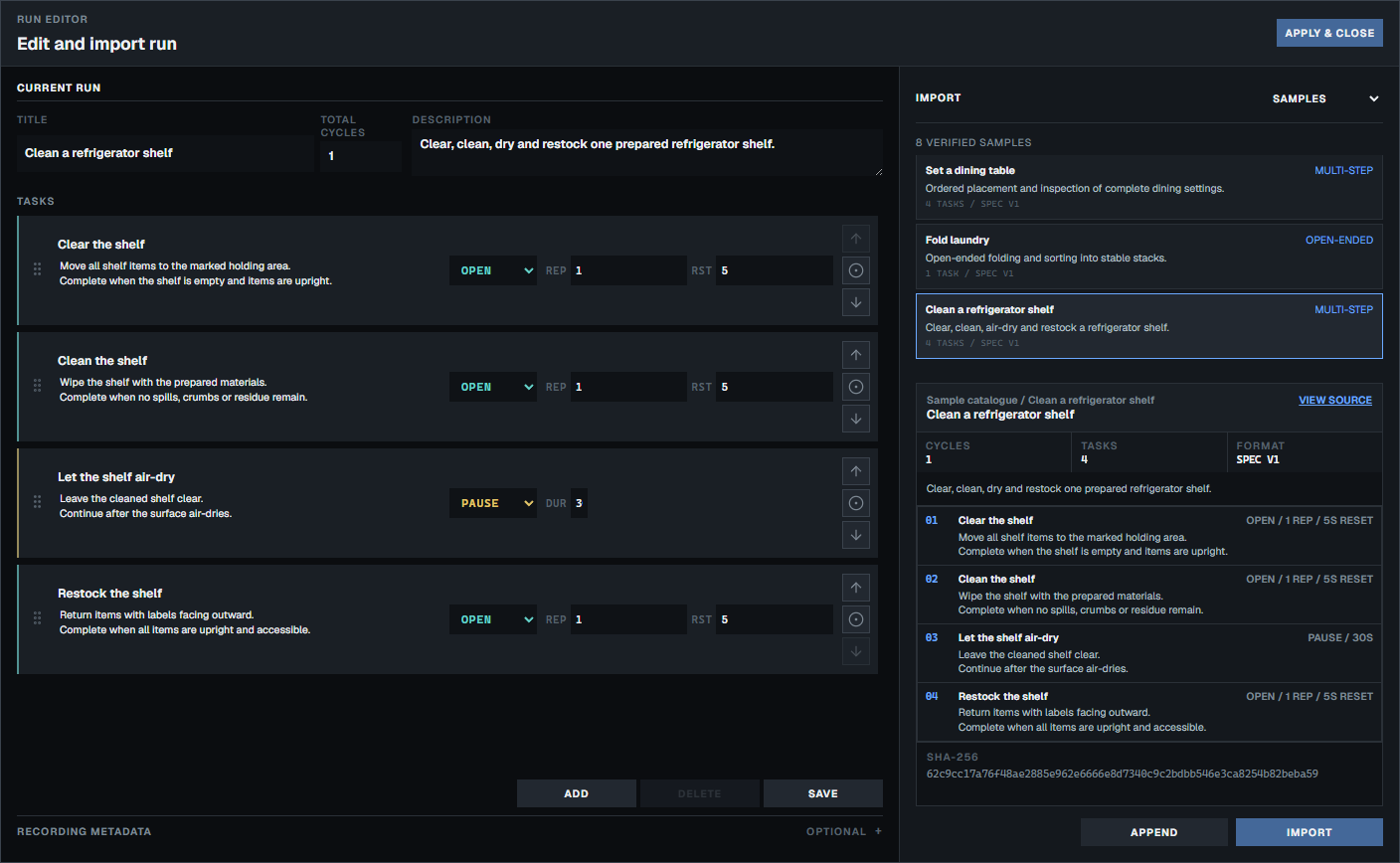
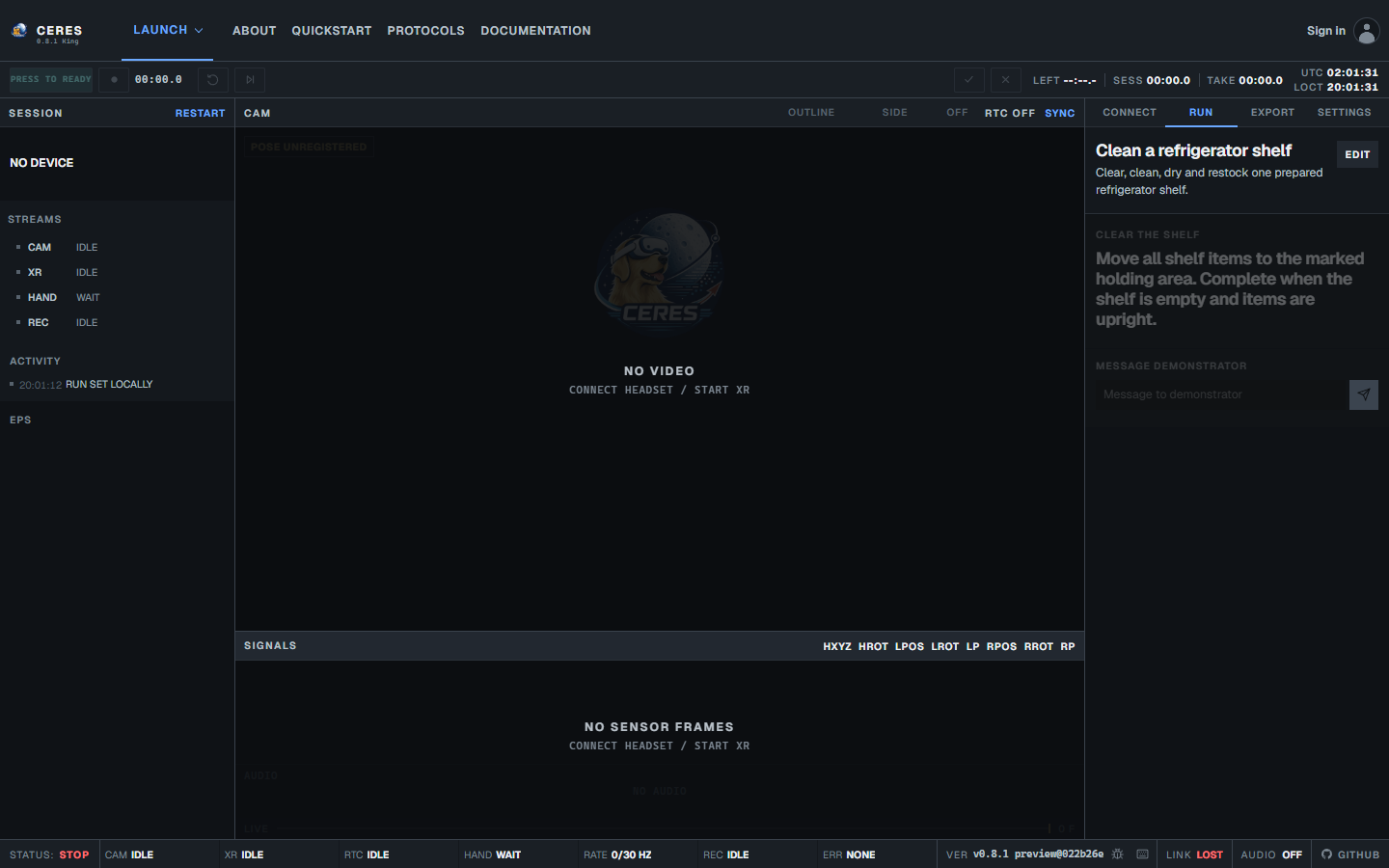
CERES puts those proof surfaces into the capture workflow. The task editor defines repeatable actions, the pre-pairing monitor exposes connection and recorder readiness, the headset HUD keeps the current cue and controls in view and speed and visibility warnings help the demonstrator correct avoidable motion problems.
- Task editor combines open, timed and pause steps into a repeatable schedule.
- Capture director shows connection, run and recorder-readiness state before a take begins.
- Headset HUD keeps task cues, hand outlines and valid run controls in the demonstrator's view.
- Speed and visibility warnings identify a fast or missing hand while the take is still in progress. CERES warns conservatively at 1.2 m/s and marks speed critical at 2.0 m/s, before policy quality is typically affected at around 2.5 m/s and tracking begins to degrade at around 3.5 m/s.
The tasking model
A task describes one action and its demonstrator cue. It may be open, ending when the capture director advances it, or timed, ending after a fixed duration. Repetitions repeat that task within a cycle, reset time gives the demonstrator a defined interval between attempts and cycles repeat the complete ordered schedule.
Reset follows every timed or open attempt
Beaming (available in Duet capture) lets the capture director send a short live instruction without changing the task schedule. The cue appears in the headset as a visual message and, when prompt audio is enabled, can also be spoken to the demonstrator.
Duet or solo?
Use the paired capture director and demonstrator surfaces when one person directs another. Use Solo mode when the demonstrator also controls the run on the capture device. Solo loads and edits the same task model, records through the same durable journal and exports the same LeRobot v3 dataset contract without an invitation, relay or second browser. Selecting a runnable task starts the default three-second countdown before recorder arming.
Privacy first
CERES keeps local-session recordings between the demonstrator and capture director on your network. Research teams remain responsible for consent, access control, retention and the secure handling of recorded data. Read the privacy and consent guide.
Open source and self-hosting
The CERES core is maintained by HCLTech Robotics and available under the MIT licence. Use it, modify it and deploy it on your own infrastructure, including for commercial work. The public repository contains the capture, recorder, export and self-hosting source. Documentation is available here. Please cite the version you use in your work.
@software{hcltech_robotics_ceres_2026,
  author  = {Foldi, Tamas and von Csefalvay, Chris and Unni Krishnan, Achyuthan},
  title   = {{CERES: Capturing Egocentric Recordings with Ease and Speed}},
  year    = {2026},
  version = {1.1.3},
  doi     = {10.5281/zenodo.22729060},
  url     = {https://github.com/hcltech-robotics/ceres},
  license = {MIT}
}
Frequently asked questions
- What is CERES?
- CERES is a browser-first research utility for directed and supervised egocentric capture with COTS XR headsets, currently supporting the Meta Quest.
- What problem does CERES solve?
- It gives research teams one repeatable workflow for task direction, capture oversight, aligned recording, explicit loss accounting and dataset export.
- What hardware does CERES require?
- Capture requires a compatible Meta Quest headset. Paired capture also uses an ordinary browser for the capture director, while Solo runs on the headset without a second device. We recommend a high-speed internet connection.
- What does CERES record?
- It aligns outward video, optional microphone audio, head pose, WebXR hand tracking, task boundaries and explicit missing-observation gaps on one recorder clock.
- What makes capture directable?
- The capture director defines the ordered task schedule, sends cues and controls progression, retries, pauses and stopping from the browser.
- What is supervisable capture?
- The capture director can follow readiness, connection, recorder, task and quality state while the demonstrator sees the current cue and valid controls in Quest.
- Can CERES be used by one person?
- Yes! We specifically built Solo for this. Solo uses the same task model, durable recorder and export contract without an invitation or second browser.
- Where does captured data go?
- Recorder blocks first enter origin-private browser storage. Paired capture replicates acknowledged data to the capture director browser or configured local host. Export writes to browser storage or a selected local folder. It sends data to Hugging Face only when explicitly selected.
- What format does CERES export?
- Accepted episodes use a LeRobotDataset v3-compatible layout with aligned media, sensor rows, task metadata and provenance sidecars.
- What is the licence?
- The CERES core is available under the MIT licence, which permits use, modification and redistribution, including commercially.
- How do I cite CERES in my own work?
- Copy the BibTeX citation above and link to the public GitHub repository when describing the software used.
- What are the current limitations?
- At present, only the Quest Browser on a compatible Meta Quest is supported. Relay-only (TURN) forwarding is experimental and available only to approved users.
- What about commercial use?
- MIT permits commercial use. We also offer supported CERES integrations.
- Why do you have weird version names?
- CERES is an abbreviation, but is also of course the dwarf planet Ceres I, where the Expanse series starts. It was only natural to use ships from the Expanse series for versions.